Projection Mapping,
VJing, DMX & 3D Physics
Draw directly onto live mapping canvases, warp 3D geometry onto organic surfaces, simulate liquid physics, track camera fixtures, auto-rig animatronics, and perform live with AI assistance.
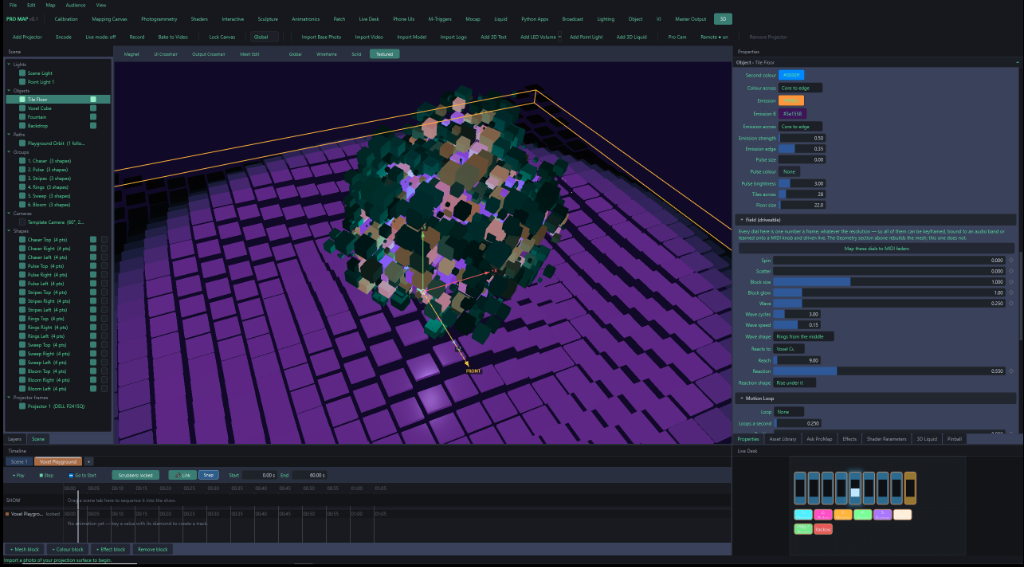
Designed for Live Performance & Precise Control
ProMap features a clean, high-density dark UI built for high-stakes VJ sets, mapping installations, and live broadcast studios.
3D Voxel Playground & Drivable Fields
Real-time keyframeable geometry dials, emission strength, wave pulses, and live MIDI parameters.
Key Capabilities
- Voxel Cube & Tile Floor Generators
- Audio-reactive Drivable Dials
- Real-time Shaders & Emission Controls
- Live Desk MIDI Mapping Matrix
Built for Heavy-Duty Live Productions
ProMap eliminates the need to jump between multiple applications. Everything from 3D photogrammetry to DMX lighting and VJ clip firing happens in one unified engine.
Direct Live Mapping Canvas
Draw shapes directly onto live output feeds and warp any content into them instantly.
Grid & Perspective Corner-Pin
Corner-pin and full grid warping with raise/lower control points for complex organic surfaces.
Multi-Projector Edge Blending
Seamless multi-projector overlap blending with gamma correction and luminance falloff controls.
Fulldome & Dome Mesh Projection
Per-projector warp meshes and blended overlaps designed specifically for planetariums and domes.
Naked-Eye Corner Billboards
6-sided LED cube mapping with per-panel eye alignment so visual seams completely disappear.
Viewer-Position Anamorphic Reprojection
3D geometry stays locked in space as a tracked person moves through the room.
Lightfield & Lenticular Output
Woven lenticular panel output generated directly from the 3D scene camera.
Pixel Mapping Fixtures
Drive LED lighting strips and fixtures straight from on-screen video pixels.
Video-Wall Media Slicing
Slice single high-res sources across any display grid (e.g. 2x2, 1x4, custom matrices).
Meet Ask ProMap AI
ProMap features an integrated, natural-language AI copilot that understands your entire project context. Operate menus, draw shapes, keyframe complex 3D fields, build interactive scenes, and generate custom shaders on the fly.
AI Shader Generation
Describe any visual effect in plain English (e.g. "synthwave audio-reactive neon grid with pulsing sun") and get instant compiled ISF GLSL shaders.
AI Text-to-Motion
Type an animation sequence (e.g. "humanoid character jumps off pillar and lands in liquid pool") to auto-generate 3D motion clips.
PNG Logo → Extruded 3D Solid
Drop any client PNG logo into ProMap — the AI tracing engine vectorizes and extrudes it into a bevelled 3D mesh automatically.
Configured 2D Liquid Solver (Tank: 4.0m, Viscosity: 0.35). Spawned koi fish 3D instances. Attached Webcam M-Trigger to Zone #1 (Front Door) → fires Scene #1 Intro Cue.
uniform float audioBand[4]; // Bound to Low-Mid BassSystem Requirements & Compatibility
ProMap is engineered for bare-metal hardware acceleration. Built to handle heavy multi-display outputs, high-density Art-Net DMX lighting universes, and fluid physics without frame drops.
Recommended Hardware
Multi-Display Workstations- OS: Windows 10 / 11 (64-bit)
- GPU: NVIDIA RTX 3060 / 4070 or AMD Radeon RX 6700+ (Vulkan / Direct3D 12 support)
- CPU: Intel Core i7 / AMD Ryzen 7 (8+ cores recommended for photogrammetry & fluid solver)
- RAM: 16 GB DDR4/DDR5 (32 GB for 3D scanning & heavy mesh bakes)
Protocols & I/O
DMX, MIDI, Lasers & Sensors- DMX Lighting: Native Art-Net, sACN, auto-patching up to 128 DMX universes
- MIDI Controllers: Native learn desk, ready-made templates, banks & mode toggles
- Sensors: Kinect v2 / Azure Kinect depth sensors, IR tracking, webcam motion capture
- Hardware: Laser DAC output interfaces, 16-bit servo controllers via DMX/Serial
Codecs & Formats
Media & 3D Assets- Video Codecs: GPU-decoded HAP, HAP Alpha, HAP Q, MP4 (H.264 / HEVC), ProRes
- 3D Assets: glTF / GLB 2.0, OBJ, FBX with PBR materials and textures
- Shaders: ISF (Interactive Shader Format), custom GLSL fragment/vertex shaders
- Audio: ASIO low-latency driver support, multi-band FFT frequency analyzer
Perpetual License. No Subscriptions.
Buy ProMap once, own it forever. Includes instant secure license key generation, offline activation for live event rigs, and free software updates.
Free Trial Demo
Test all features on your hardware before purchasing.
- Full access to all mapping & 3D workspaces
- Liquid physics, animatronics & DMX workspace
- Ask ProMap AI assistant integration
- • Non-commercial evaluation watermark
ProMap Perpetual
Single purchase for lifetime use on up to 2 machines.
- Zero Watermark: Clean full-res output
- 2 Machine Activations: Primary rig + Backup show PC
- Offline License Key Activation: No internet needed at venue
- Multi-Projector & Art-Net: Unlimited outputs & DMX universes
- Ask ProMap AI Access: Unlimited natural language commands
- 1 Year Free Updates: Includes all point releases
Studio & Fleet
For AV rental houses, touring productions, and installations.
- 5 Floating Machine Activations
- Centralized License Portal (Deactivate/Reassign keys)
- Priority Direct Developer Support
- Custom Hardware & DMX Rig Templates
Documentation & User Guides
Everything you need to master ProMap, from live VJ performance setups to advanced animatronics and photogrammetry.
Quick-Start & Mapping Setup
Connect your display outputs, calibrate project mesh faces, and set up grid warping.
Art-Net & DMX Workspace
Auto-patch lighting fixtures, map live video pixels to DMX channels, and configure Art-Net.
Ask ProMap AI Commands
Learn how to prompt the integrated AI assistant for scene building, shaders, and text-to-motion.
VJ & Live Desk Controls
Set up MIDI controllers, load GPU HAP video clips, and manage beat-quantized scenes.